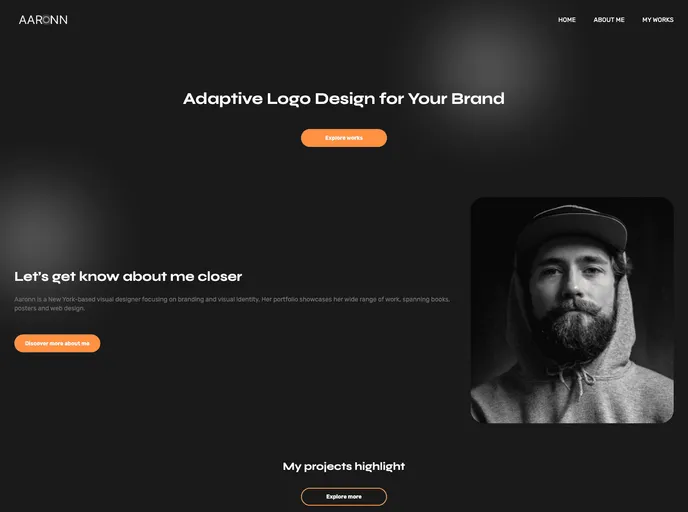
Dark theme portfolio website created using tailwindcss.
Overview:
The Tailwind CSS Portfolio Website is a template designed to showcase your skills, projects, and achievements in a clean and professional manner. Whether you’re a developer, designer, or any other creative professional, this portfolio website will help you create an impressive online presence. It features a responsive design, easy customization, a modern and minimalistic approach, and a section-based structure.
Features:
- Responsive Design: The website is fully responsive and adapts to various screen sizes, ensuring a great user experience on desktop, tablet, and mobile devices.
- Easy to Customize: The code is written in HTML and Tailwind CSS, making it easy for you to customize the layout, colors, and content to match your personal brand.
- Modern and Minimalistic: The design follows a modern and minimalistic approach, allowing your work to take center stage without any distractions.
- Section-based Structure: The website is divided into several sections, including About, Projects, and Testimonials. This structure helps you organize your content effectively.
- CSS Framework: The website is built using Tailwind CSS, a utility-first CSS framework that provides a wide range of pre-built components and utilities to speed up your development process.
Installation:
Follow these instructions to get a copy of the project up and running on your local machine for development and testing purposes:
- Clone the repository:
git clone [repository-url]
- Navigate to the project folder:
- Install the dependencies:
- Build the CSS:
- Open the website:
- If you’re using a local development server, open the website in your browser at http://localhost:3000.
- If you’re using a static server, copy the contents of the dist folder to your server and open the website in your browser.
- Customize the content:
- Open the index.html file in your favorite code editor.
- Modify the content, colors, and layout as per your requirements.
- Add your own projects, skills, and information to showcase your work.
- Deploy your website:
- If you’re using a static server, upload the contents of the dist folder to your hosting provider.
- If you’re using a different deployment method, follow the appropriate steps to deploy your website.
Summary:
The Tailwind CSS Portfolio Website template is a great tool for creative professionals to showcase their skills and projects. With its responsive design, easy customization, and modern approach, it allows users to create an impressive online presence. Built using the Tailwind CSS framework, this template provides a range of pre-built components and utilities to speed up development. Whether you’re a developer, designer, or any other creative professional, this template can help you create a clean and professional portfolio website.