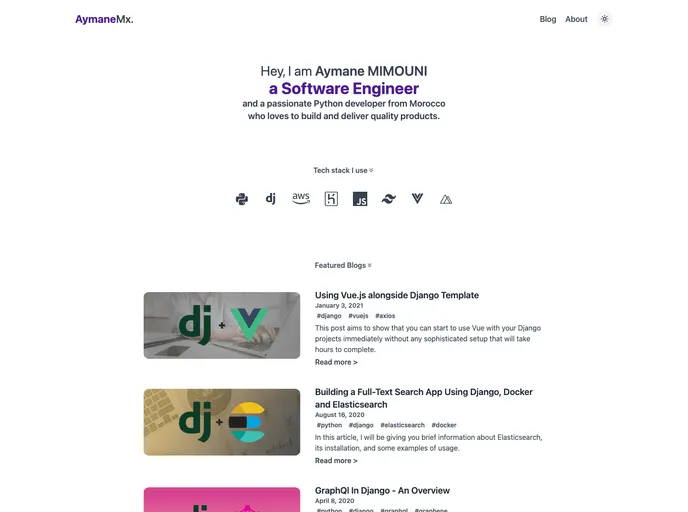
Overview:
The Nuxt Portfolio Deva is a portfolio website template designed specifically for developers. It includes a blog powered by Notion and can be easily deployed to Netlify. The template features a minimal and clean design, with the option to switch between dark and light mode. It is also responsive and mobile-friendly, making it suitable for viewing on tablets and smartphones. The template can render articles from Notion, fetch Github pinned projects with the most stars, and has Eslint & Prettier configured for code formatting. It also integrates with Google Analytics and generates a sitemap. Deployment to Netlify is a one-click process.
Features:
- Minimal and clean portfolio: The template has a simple and uncluttered design, allowing your projects and content to take center stage.
- Dark/light mode: The template automatically detects the system color mode and adjusts the website’s theme accordingly.
- Responsive: The template is designed to be mobile-friendly and can adapt to different screen sizes, ensuring a seamless user experience on tablets and smartphones.
- Render articles from Notion: You can easily create and manage blog posts using Notion, and the template will render them on your portfolio website.
- Fetch Github pinned projects: The template can fetch your projects from Github and display the ones with the most stars, showcasing your popular repositories.
- Eslint & Prettier configured: The template has Eslint and Prettier configured for code linting and formatting, ensuring clean and error-free code.
- Google Analytics integration: You can integrate your Google Analytics account with the template, allowing you to track and analyze website traffic.
- Generate sitemap: The template automatically generates a sitemap.xml file, making it easier for search engines to crawl and index your website.
- One-click deployment to Netlify: Deploying your portfolio website to Netlify is a quick and hassle-free process.
Installation:
To install the Nuxt Portfolio Deva template, follow these steps:
- Create a Notion account if you don’t have one.
- Duplicate the template by clicking on the “duplicate” button located at the top of the page.
- Make your Notion table public by clicking on the “share” button located at the top of the page.
- Grab the table ID from the table link.
- Do the same thing for the About page ID (this will be used as an environment variable: NOTION_ABOUT_PAGE_ID).
- Optionally, obtain your Google Analytics ID if you want to integrate it with the template.
- Click on the deploy button and fill out the Netlify form to deploy the template to Netlify.
- Create a .env file with the following variables:
NOTION_TABLE_ID=<Your Notion table ID>
NOTION_ABOUT_PAGE_ID=<Your Notion About page ID>
GOOGLE_ANALYTICS_ID=<Your Google Analytics ID>
- Configure any additional settings or customization as needed.
Summary:
The Nuxt Portfolio Deva is a versatile and user-friendly portfolio website template specially designed for developers. It offers a range of features including a blog powered by Notion, integration with Github for displaying your projects, dark/light mode, responsiveness, code linting and formatting, Google Analytics integration, sitemap generation, and easy deployment to Netlify. By following a simple installation guide, developers can quickly set up their portfolio website and showcase their projects and content effectively.