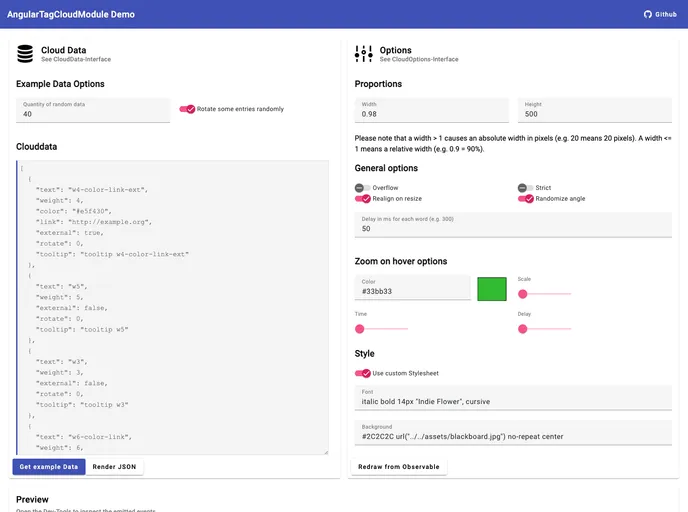
This angular module contains a component which generates tag clouds.
The Angular Tag Cloud Module is a robust tool designed for generating visually appealing word clouds within Angular applications. This module allows developers to create interactive tag clouds that represent data in an engaging manner. It’s particularly useful for displaying keywords, tags, or any other set of terms that can benefit from being visually emphasized. With compatibility across various Angular versions, it is a versatile addition to any developer’s toolkit.
What makes this module stand out is its easy installation process and rich feature set that enables customization of the tag cloud’s appearance and behavior. Whether you want to showcase popular keywords or create a dynamic visual representation of data, the Angular Tag Cloud Module provides the necessary framework to get you started.
Compatibility with Angular Versions: The module supports various Angular versions starting from 6.0.0, ensuring broad usability across projects.
Customizable Weighting: Users can define the importance of each word through a weight property, allowing for dynamic scaling of the word cloud.
HTML Tag Flexibility: The module supports multiple HTML tags for integration, including <angular-tag-cloud> and <ng-tag-cloud>, making it adaptable to your coding style.
Random Angle Generation: Each entry in the tag cloud can have a randomly generated angle, enhancing its visual diversity.
Strict Mode for Weights: You can choose strict mode to manually set weights as integers from 1 to 10, providing precise control over the cloud’s appearance.
Peer Dependency Requirement: To function correctly, the module requires a peer dependency on angular/core version 6.0.0 or higher, aligning it with modern Angular practices.
Easy Installation: Quickly install the module using npm or yarn with simple command-line instructions, streamlining the setup process.
Comprehensive Documentation: Full documentation is available for cloning and local access, ensuring that developers have all the information needed to utilize the module effectively.

