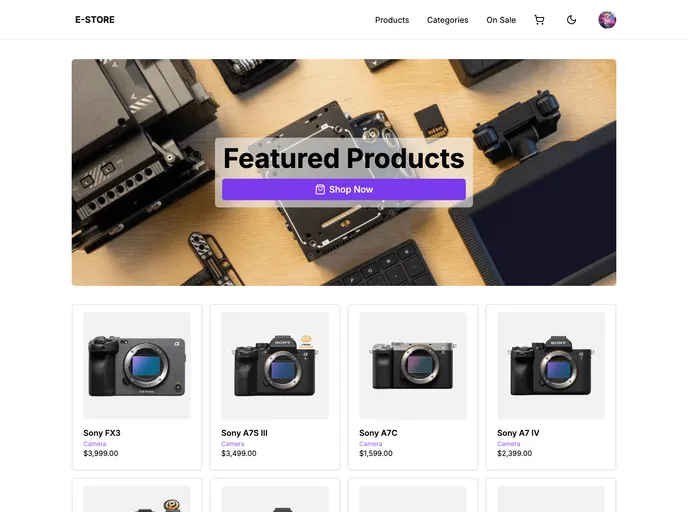
Sticky Navbar On Scroll
|Updated:
5 Oct 2023
|9 Stars
sticky Navbar hide/show on scroll (my original, using useState + useEffect), shadcn + next-themes(learned from codeSTACKr), frosty header (learned from Saraev Media)
Categories
Overview
The sticky Navbar that hides and shows on scroll is a modern web design feature that enhances user experience by maintaining navigational accessibility without taking up valuable screen space. This functionality allows the navbar to seamlessly integrate into the user interface, only appearing when needed, ensuring that the focus remains on the content. The combination of useState and useEffect is utilized effectively for this implementation, while the frosty header adds a stylish touch to the overall appearance.
Features
- Dynamic Visibility: The Navbar intelligently hides when scrolling down and reappears when scrolling up, improving accessibility without cluttering the screen.
- React Integration: Built using React hooks (useState and useEffect), ensuring a smooth and responsive user experience.
- Customizable Appearance: The frosty header styling allows for a visually appealing design that can be tailored to suit the overall theme of the website.
- Light/Dark Mode Support: Compatibility with next-themes, enabling seamless transitions between light and dark modes for improved readability based on user preference.
- User-Friendly: Enhances navigation without overwhelming the user, creating a more focused content experience.
- Smooth Animation: Features smooth transitions when showing and hiding, adding to the overall aesthetic of the site.
- Responsive Design: Adjusts seamlessly across different screen sizes, ensuring consistent functionality on mobile and desktop devices.