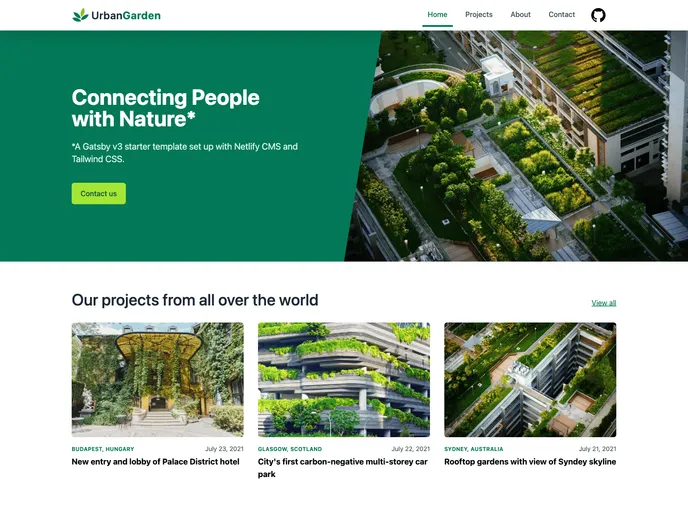
Gatsby Netlifycms Tailwind Starter screenshot

Gatsby Netlifycms Tailwind Starter

Author Avatar Theme by Jimmybutton
Updated: 12 Oct 2021
31 Stars

An example website built using Gatsby v3, Netlify CMS and Tailwind CSS.

Categories

Overview

Netlify Status is a website built using Gatsby v3, Netlify CMS, and Tailwind CSS. It serves as a demo site for a fake urban gardening agency and includes a landing page, a project portfolio, an about page with team members, and a contact form.

Features

  • Gatsby v3: The website is built using the latest version of Gatsby, a modern static site generator.
  • Netlify CMS: The site includes an admin area powered by Netlify CMS, allowing easy content management.
  • Tailwind CSS: Styling is done using Tailwind CSS, a utility-first CSS framework.
  • Performant images: Images on the site are optimized for performance using the gatsby-plugin-image and gatsby-plugin-sharp.
  • Site metadata: The site includes metadata tags for search engine optimization using react-helmet.
  • Sitemap: A sitemap is generated for the website using the gatsby-plugin-sitemap.
  • Robots.txt: The site includes a robots.txt file generated using the gatsby-plugin-robots-txt.
  • Persistent navbar and footer: The navbar and footer components remain persistent throughout the site using gatsby-plugin-layout.

Installation

To set up the development environment for this website, follow these steps:

  1. Clone the repository from the git repo.
  2. Install the required dependencies by running the command npm install in the project directory.
  3. Start the development server by running the command npm run develop.
  4. The site will now be available at localhost:8000/.

To connect Netlify CMS to your local git repo, you can run the following command in a separate terminal:

$ <command>

The Netlify CMS Admin will then be available at localhost:8000/admin. For more detailed instructions on setting up the CMS, refer to the Netlify CMS Docs.

Summary

Netlify Status is a demo website built using Gatsby v3, Netlify CMS, and Tailwind CSS. It showcases features such as performant image optimization, metadata tags, sitemaps, and persistent navigation. The installation process is straightforward, and the website can be easily customized and managed using Netlify CMS.
