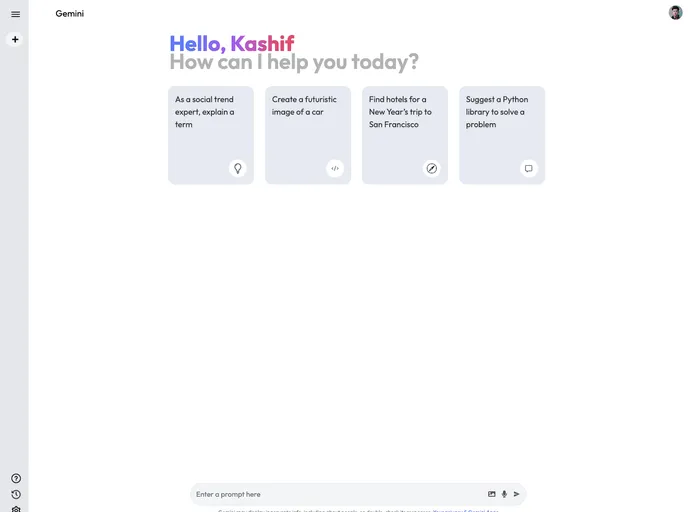
Build a Generative AI App with Google Gemini API using React JS and Tailwind CSS. Gemini App Overview The app features a clean UI with suggested questions and a chat box for interacting with the AI. A collapsible sidebar stores past questions for easy access. Customize it for your needs!
Create React App is an essential tool for any developer looking to create single-page React applications with ease. It simplifies the process of setting up a new React project by providing a ready-to-go environment with a variety of useful scripts and features. Designed with user-friendliness in mind, Create React App allows developers to focus on writing code without the need for deep knowledge of configurations and build tools.
The project gives you a structured way to build applications, offering development and production configurations right out of the box. This makes it particularly appealing for those who want to dive into React development without the overhead of managing build setups, while still allowing for flexibility and customization when needed.
Easy Initialization: Quickly set up a new React project with just one command (npx create-react-app my-app), getting you started in no time.
Development Server: Use npm start to run a local server that automatically reloads whenever you make changes to your code, making the development process smooth and efficient.
Automated Testing: Launch a test runner in interactive mode with npm test, allowing you to test your components seamlessly and ensure code quality.
Production Build: The npm run build command compiles your application for production, optimizing files for performance and creating a build directory that’s ready for deployment.
Eject Option: If you need to customize the build configuration, npm run eject gives you full control by copying all configuration files to your project. However, this is a one-way operation, so use with caution.
Clear Documentation: Comprehensive documentation is available, guiding you through setup and advanced features, making it easier to learn and leverage React efficiently.
Performance Optimizations: Automatically minified code and hashed filenames in production builds ensure faster load times and better maintainability.
Customization Flexibility: While the tool’s curated feature set suits smaller projects, it also allows for advanced configurations, so you can tailor it to the unique needs of larger applications when necessary.

