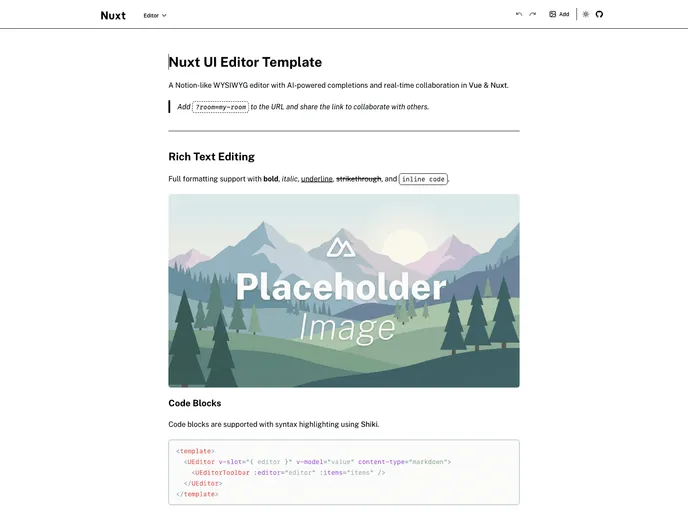
Editor screenshot

Editor

Updated: 13 Jan 2026
97 Stars

Notion-like WYSIWYG editor with AI-powered completions and real-time collaboration in Vue & Nuxt.

Categories

Overview

The Nuxt Editor Template is a cutting-edge WYSIWYG editor designed to bring the best of Notion-like features along with AI-powered completions to your projects. Built with Vue and Nuxt, it leverages the robust components of Nuxt UI and TipTap, making it a versatile tool for both developers and content creators. This editor stands out with real-time collaboration capabilities, allowing teams to work seamlessly together on documents, making the editing process much more dynamic and interactive.

What sets this template apart is its advanced functionality combined with user-friendly features that simplify content creation. With rich text editing, table insertion, and an intuitive interface, editors can effortlessly create and manage complex content. When augmented with AI features, the editor not only enhances productivity but also encourages a more engaging writing experience.

Features

  • Rich Text Editing: Enjoy full formatting support including headings, lists, blockquotes, and code blocks for versatile content creation.
  • Tables: Easily insert and edit tables with comprehensive controls for rows, columns, and cell selection, perfect for organized data representation.
  • Bubble & Fixed Toolbars: Contextual toolbars adapt based on your selection, ensuring the tools you need are always at your fingertips.
  • Image Upload: Custom image upload functionality powered by NuxtHub with Vercel Blob simplifies adding visual elements to your content.
  • AI-powered Features: Inline completions and intelligent text transformations assist in enhancing your writing with tools for grammar checking, summarization, and translation.
  • Real-time Collaboration: Engage in collaborative editing that allows multiple users to work simultaneously, enhancing team productivity.
  • Markdown Support: Easily serialize your content with markdown support, ensuring compatibility and ease of use for developers and writers alike.
  • Slash Commands: Utilize quick insertion commands for a more efficient editing process; access functions simply by typing ‘/’.

With its impressive array of features, the Nuxt Editor Template not only makes editing easy but also turns it into a collaborative and AI-enhanced experience.
